Smart layouts
Balanced grids adapt automatically whenever the window or video set changes.
 Anyao Multi Video Player
MULTI-VIDEO DESKTOP PLAYER
Anyao Multi Video Player is a free desktop app for playing and comparing local videos in one adaptive grid. Available for macOS and Windows.
Local-first. Your videos stay on your computer.
SEE IT IN ACTION
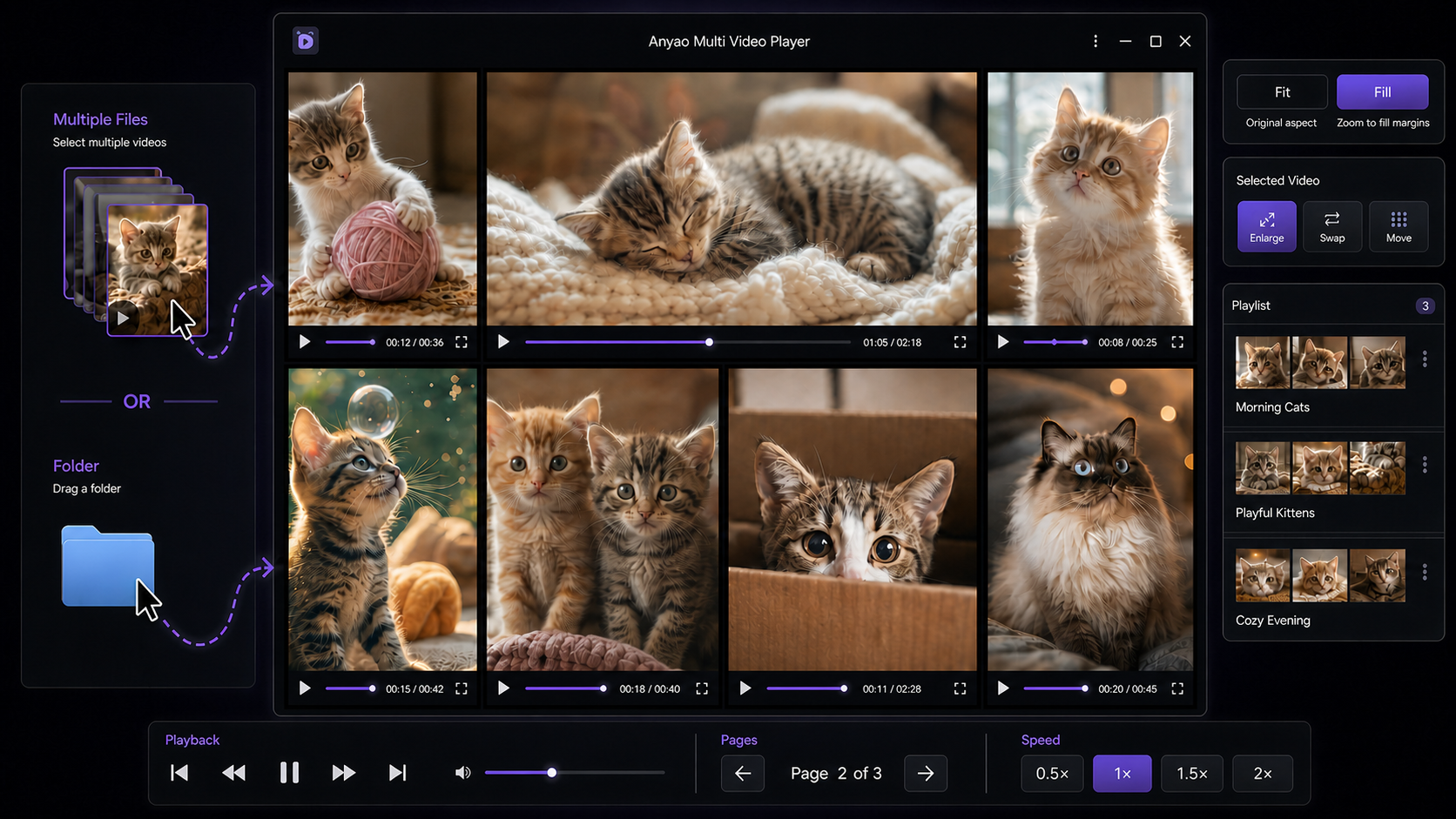
Drop in multiple files or a folder, compare every video in a flexible grid, and keep your favorite arrangements ready in playlists.
FEATURES
Balanced grids adapt automatically whenever the window or video set changes.
Load supported videos in one action, replace the current set, or add more.
Each tile has its own controls, while shortcuts handle playback, mute, view, and fullscreen.
Recall video sets with thumbnails, ordering, layout, fit/fill, zoom, and position.
Keep the complete frame or use every pixel. Zoom and pan individual videos when needed.
Pro removes app limits so the practical ceiling is determined by your hardware.
Keep the video wall above your other windows while you work, reference footage, or monitor several clips.
Set independent start and end points for each video to repeat only the scene you need to compare.
Correct sideways footage independently with one-click left and right rotation—without changing the source file.
Drag one tile onto another to swap only those two videos—even between portrait and landscape slots.
Reset one video to the beginning and clear its zoom, pan, rotation, loop range, and individual audio state.
Extra videos move to additional pages with centered controls for quick switching.
VIDEO COMPATIBILITY
The container is only part of the story. The video and audio codecs inside each file determine actual playback compatibility.
| Container | Recommended codecs | Compatibility |
|---|---|---|
| MP4 / M4V | H.264 video + AAC audio | Recommended |
| WebM | VP8 / VP9 + Opus / Vorbis | Recommended |
| MOV | H.264 video + AAC audio | Common |
| OGV | Theora video + Vorbis audio | Varies |
| AVI / MKV | Depends on the codecs inside | Not guaranteed |
Recognized containers: MP4, MOV, M4V, WebM, OGV, AVI, and MKV. WMV is a legacy format and is not supported; convert it to H.264/AAC MP4 before loading. HEVC/H.265, uncommon codec profiles, and damaged files may not play even when the file extension is recognized.
FREE & PRO
| Feature | Free | Pro |
|---|---|---|
| Videos loaded at once | Up to 8 | Unlimited* |
| Layout | 2 × 4 | Custom rows and columns |
| Playlists | Up to 10 | Unlimited* |
*Subject to your computer's performance. Pro is a one-time purchase with a lifetime license for up to 5 active devices. Deactivate a device before moving the license to another device. Manual activation resets are not guaranteed.
Get Pro · ¥980All sales are final. Please test the Free version before purchasing. By purchasing, you agree to the Terms of Use and Privacy Policy.
DOWNLOAD
Three native downloads. No account required for Free.
Optimized for modern Macs with an Apple chip.
For earlier Macs powered by an Intel processor.
A familiar installer for 64-bit Windows PCs.
FIRST LAUNCH
If macOS says the app “is damaged and can’t be opened,” the download is usually being blocked because this build is not notarized by Apple.
xattr -dr com.apple.quarantine "/Applications/Anyao Multi Video Player.app"Run this command only for a copy downloaded directly from this official page. It removes the macOS quarantine attribute from this app only.
Read Apple's security guidance ↗The Windows installer is not code-signed. Microsoft Defender SmartScreen may show “Windows protected your PC” on first launch.
Only bypass SmartScreen for a file downloaded from the official release linked on this page.
Read Microsoft's SmartScreen guidance ↗FAQ
Choose arm64 for Apple silicon (M1 or newer) and x64 for an Intel Mac. Check Apple menu → About This Mac if you are unsure.
The builds are not registered or notarized with Apple and Microsoft. If macOS says the app is damaged, copy it to Applications and run the Terminal command in the first-launch instructions. On Windows, select More info → Run anyway. Follow these steps only for files downloaded directly from this official page.
See the Video Compatibility table above. MP4 or M4V with H.264/AAC and WebM with VP8/VP9 are recommended; playback of every codec is not guaranteed. WMV is not supported and should be converted to H.264/AAC MP4.
Pro removes the app's numeric limit. The practical number of simultaneous videos depends on your computer, available memory, GPU, video resolution, bitrate, and codec.
Use the link in your Polar purchase email or sign in to the Polar customer portal with the email address used at checkout. Your purchase includes the Pro license key.
Open the license screen on the old device and select Deactivate License before activating the new device. Up to five devices can be active at once. Manual activation resets are not guaranteed.
Quit the app and download the latest build for your computer. On macOS, open the new DMG, drag the app to Applications, and choose Replace. On Windows, run the new installer over the existing installation. Do not uninstall the old version or deactivate your license first. Your Pro license and local settings should remain available after an in-place update. If Pro is not recognized, activate it again with the same license key from the Polar customer portal. Because the builds are unsigned, your operating system may show the first-launch warning again after an update.
Yes. Updating Anyao Multi Video Player does not require another purchase, and your existing Pro license remains valid. Available updates may be installed at no additional charge, but future updates, new features, and continued operating-system compatibility are not guaranteed.
Continued compatibility with future macOS or Windows versions is not guaranteed. Updates and fixes may be provided on a reasonable-efforts basis, without a guaranteed schedule.